↯
Native-speed printing
Send raw ZPL or Honeywell Direct Protocol / Fingerprint commands for crisp output without waiting for large image buffers.
Turn your Android phone, tablet or rugged handheld into a fast, capable industrial print terminal. Design, edit and print labels wherever the work takes you.
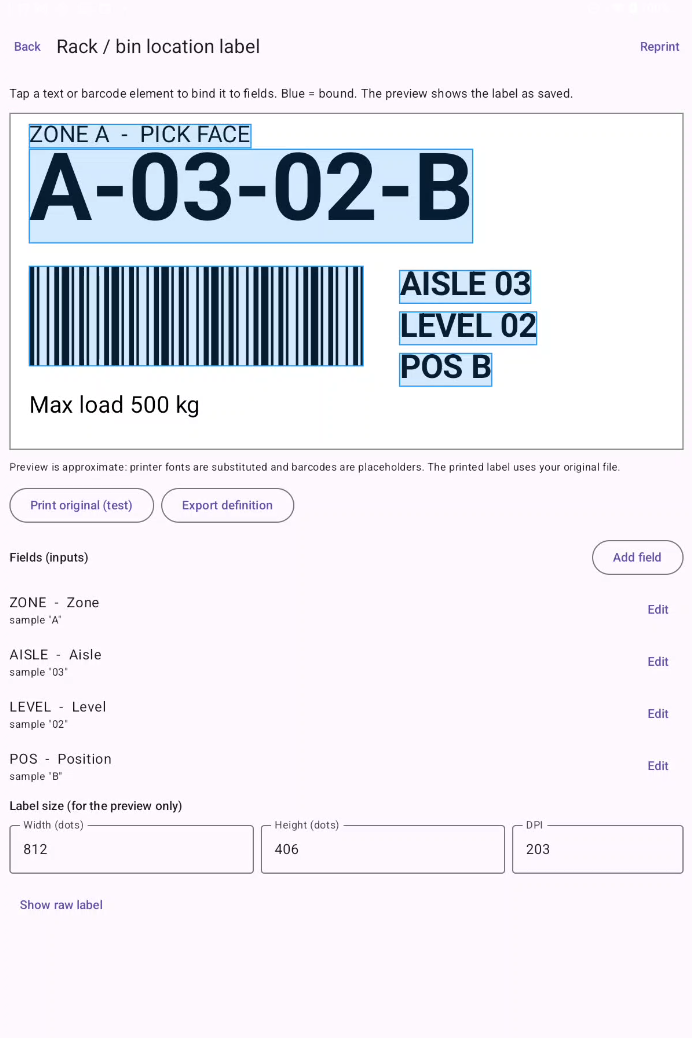
Takumi Print speaks directly to compatible printers in their native languages, avoiding the slow image-rendering workflows that can hold mobile printing back.
Send raw ZPL or Honeywell Direct Protocol / Fingerprint commands for crisp output without waiting for large image buffers.
Create and print at the point of work using Bluetooth or a network connection over Wi-Fi or LAN.
Get the label workflows you need in a purpose-built mobile app, without paying for bloated desktop software.
Use a ready-made template, bring your own native label file, or build a clean layout for the job at hand.
Start with practical templates for logistics, warehousing, retail, shelf labelling and manufacturing.
Create layouts with text, barcodes, QR codes and DataMatrix symbols directly on your Android device.
Import CSV and spreadsheet data from Google Drive, OneDrive or local storage to drive high-volume print batches.
Scan a damaged barcode with your device camera or integrated scanner, update variable fields and print a replacement in seconds.
Import existing native label files and use data-driven batch and reprint workflows while on the move.
Enter variable data on the spot and print individual labels without returning to a desktop.
The editor makes variable fields easy to identify and bind. Preview the saved label, update the inputs and send the job directly to your printer.
Takumi Print is built for native industrial printer languages and practical mobile connectivity.
For ZPL-compatible mobile, desktop and industrial printers.
For printers supporting Direct Protocol and Fingerprint.
Core label creation and single-label printing are available in the free tier. Pro adds advanced data-driven workflows.
Everything you need to get started with mobile label printing.
For teams that need spreadsheet-driven batches and fast reprint workflows.
Pricing shown in USD as supplied. Confirm local Google Play pricing and availability in your region.
Takumi Print brings native industrial label printing to the Android devices your team already carries.
Google Play listing coming soon ↗The Google Play link can be added here once your app listing is published.